WordPress MCP and WebMCP: How to Prepare Your Site for AI Agents
A guide for companies on WordPress: what MCP and WebMCP are, how the Abilities API and the MCP Adapter work, what to expose to an AI agent, how to protect it and how to test it.
MCP (Model Context Protocol) is the open standard that connects AI assistants to external systems. In WordPress, the Abilities API declares what the site can do, and the MCP Adapter delivers those abilities to clients such as Claude and ChatGPT. WebMCP is Chrome's proposal for the page itself to offer tools to the browser's agent. Preparing your site means choosing which actions to expose, with least privilege, and testing before you open anything up.
Sources verified on September 30, 2026. Next review: at the release of WordPress 7.2.
On August 31, 2026, the ChatGPT release notes, published by OpenAI, recorded a change that is short on the page and large in effect: ChatGPT Work and Codex can now use "tools that supported websites provide" in the browser of the desktop app, and those tools use WebMCP. A general-purpose assistant stopped merely reading pages and started calling functions that the site itself declares.
WordPress came to this conversation by another route. Since version 6.9, released in December 2025, core has included the Abilities API, which registers what the site can do in a format that machines understand. The MCP Adapter turns those abilities into tools for agents, and the roadmap for WordPress 7.2, a release planned for early December 2026, includes publishing it in the official plugin directory.
This guide explains what each piece is, how MCP and WebMCP differ, what makes sense to expose on a company website, how to protect it and how to test it. It also separates what is already available from what is still an experiment.
From a site that is read to a site that is operated
Until now, the conversation about AI and websites has revolved around reading: which crawlers visit the pages, whether to train models or to answer searches. That is the subject of our guide to AI crawlers.
An AI agent does something else: it carries out tasks on a person's behalf, such as requesting a quote, scheduling a meeting or checking whether a product is available. Without help from the site, it works like a visitor in a hurry. It looks at screenshots, reads the page code and the accessibility tree, and tries to guess which button does what. Google's guide to optimizing for generative AI describes these same signals.
What is new in 2026 is that a site can declare its own actions. Instead of the agent inferring that a button sends a quote request, the page states: this is the "request a quote" tool, these are the fields, this is the result.
Layer
What the agent does
What the site controls
Question it answers
Reading
Reads, summarizes and cites the content
robots.txt, CDN and clarity of the content
What does AI know about your company?
Action
Carries out tasks on the site
Tools declared through MCP or WebMCP
What can AI do on your site?
Governance
Acts within limits
Permissions, confirmations and logs
What can AI not do without you?
What MCP (Model Context Protocol) is
According to the protocol's official documentation, at modelcontextprotocol.io, MCP is an open standard for connecting AI applications to external systems, such as databases, tools and websites. Anthropic launched the protocol on November 25, 2024, in the announcement of the Model Context Protocol. On December 9, 2025, it moved to the Agentic AI Foundation, linked to the Linux Foundation, according to the foundation's press release.
In practice, an MCP server exposes tools with a name, a description and an input schema. An AI client, such as Claude, ChatGPT or Cursor, asks for the list of those tools and decides when to call them, as the protocol's architecture overview shows. The server runs outside the browser and is available at any time, whether or not a person is looking at the page. It is the same kind of bridge that already connects websites to CRMs, calendars and ERPs in integrations and systems projects, now with AI on the other side.
What WebMCP is
According to the Chrome documentation for developers, on the WebMCP page, WebMCP is "a proposed web standard to help you build and expose structured tools for AI agents." The difference from MCP is the place: WebMCP tools live in the page itself and exist only while it is open. They are used by the agent built into the browser, working alongside the person who is browsing.
The two ways to declare a tool
Imperative API, in JavaScript: the page registers the tool with document.modelContext.registerTool(), giving its name, description, input schema and the function that runs it, as the WebMCP specification describes in its latest draft.
Declarative API, in HTML: a form receives attributes such as toolname and tooldescription, and the browser turns the labeled fields into the tool's parameters, according to Chrome, in the declarative API documentation.
A declared quote form would look like this:
<form toolname="requestQuote"
      tooldescription="Sends a quote request to the sales team."
      action="/quote/">
  <label for="company">Company</label>
  <input id="company" name="company" type="text">
  <label for="service">Service of interest</label>
  <input id="service" name="service" type="text">
  <button type="submit">Request a quote</button>
</form>
Note that the labels (label) are part of the tool. A form that is poorly labeled for screen readers is also poorly described for an agent.
Where WebMCP stands today
Specification: a draft from the Web Machine Learning Community Group, in the version dated October 2, 2026 (accessed on October 3, 2026), with editors from Microsoft and Google. The draft text warns that it is not a W3C standard and is not on the official standards track.
Chrome: origin trial open starting with Chrome 149, announced by Chrome on June 9, 2026, on its blog for developers.
ChatGPT: since August 31, 2026, it has used WebMCP tools in the browser of the desktop app. According to OpenAI's documentation, only tools registered through JavaScript on the top-level page are included; forms with declarative attributes and tools inside iframes are left out.
Other browsers: Mozilla classified the proposal as neutral, with many open questions about real-world use, in its standards position. WebKit, the engine behind Safari, declared itself opposed in its official position: it argues that the gap should be closed in HTML itself and in ARIA.
In short: it is a serious bet, with two major backers and real use in ChatGPT, but it is not yet a web standard.
MCP or WebMCP: what is the difference
Criterion
MCP
WebMCP
Where it runs
On a server, outside the browser
In the page open in the browser
Who calls it
Any compatible AI client
The agent built into the browser
When it is available
At any time
Only while the page is open
Access
Server authentication (in WordPress, an application password or OAuth)
The person's session on the site, with confirmation for sensitive actions
Good for
Integrations, internal routines, content management and lookups
Tasks done together with the visitor: quotes, scheduling, catalog search
Status in September 2026
Open standard in use, at the Agentic AI Foundation
Proposal being trialed in Chrome, without the support of Mozilla and WebKit
Chrome sums up the relationship this way, in its comparison of MCP and WebMCP: the most effective agentic applications use both. MCP takes care of the business logic and the data; WebMCP is the final step, the agent's connection to the page the visitor has open.
On the left, MCP: a server available to any AI client, at any time. On the right, WebMCP: tools that exist only in the open page, for the browser's agent.
How WordPress is getting ready: Abilities API and MCP Adapter
Abilities API: what the site can do, declared
An ability is "a self-contained unit of functionality with defined inputs, outputs, permissions, and execution logic," according to the WordPress 6.9 dev note, published on Make WordPress Core on November 10, 2025. It is registered with wp_register_ability() and carries a name, a description, input and output schemas in JSON Schema, the function that runs it and the function that checks permission.
WordPress 6.9 (December 2, 2025): the Abilities API enters core, as recorded in the release announcement on WordPress.org, with REST API routes under wp-abilities/v1, described in the dev note cited above.
WordPress 7.0 (May 20, 2026): abilities reach the browser side, in JavaScript. The dev note on Make WordPress Core cites browser agents and WebMCP among the motivations.
WordPress 7.1 (August 19, 2026): new filters in the execution lifecycle, custom input and output validation and a single flag, 'public' => true, to say that the ability may be exposed to external clients. Without it, the ability stays private, as the note of August 4, 2026 on Make WordPress Core explains.
MCP Adapter: the bridge to AI clients
The MCP Adapter is the official project that connects the Abilities API to the Model Context Protocol, so that MCP clients can discover and run abilities from core, plugins and themes, according to the project page on WordPress's GitHub. It requires WordPress 6.9 or higher and PHP 7.4 or higher.
It works over two paths: STDIO, through WP-CLI, for local use and development, and HTTP, for remote clients, served by a route of WordPress's own REST API, with no separate server. Today it is installed as a Composer package or as a plugin downloaded from the releases published on GitHub. The WordPress 7.2 roadmap plans to publish it in the official directory and to allow MCP to be enabled through the AI plugin, with no guarantee that this will make it into the release, as the 7.2 roadmap itself says on Make WordPress Core.
AI Client and Connectors: AI inside the dashboard
WordPress 7.0 also brought an AI client into core, the AI Client, which talks to models from different providers, and the Connectors API, with the Settings > Connectors screen, for Anthropic, Google and OpenAI. The dev notes on the AI Client and on Connectors describe the two pieces. This is the opposite direction: WordPress using AI, not an agent using WordPress. The two add up, but they should not be confused.
WordPress.com has already opened writing to agents
On March 20, 2026, WordPress.com released 19 writing abilities through MCP on all paid plans: posts, pages, comments, categories, tags and media. Every change asks for confirmation, new content starts as a draft and whatever is deleted stays in the trash for 30 days, according to the company's announcement. It is a good model of limits for any site.
What makes sense to expose on a company website
The right question is not "how do I turn on MCP" but "which tasks would a customer like to delegate to an agent on my site." OpenAI's documentation offers a good starting criterion: begin with an operation the site already performs, with narrow inputs, describe the effects and return enough information to verify the result.
Type of site
Candidate action
Recommended piece
Caution
B2B company
Request a quote or a proposal
WebMCP tool on the form, registered through JavaScript
Confirm before sending; never invent a price
Manufacturing and distribution
Look up the technical catalog and specifications
Read-only ability, exposed through MCP
Public data only; inventory and commercial terms only under set rules
SaaS and services
Schedule a demo
WebMCP connected to the calendar
Confirm the time slot and the personal data
Clinics and professional practices
Book an appointment or a consultation
Tool with mandatory confirmation
Personal data under Brazil's data protection law (LGPD) and the rules of the professional board
Internal operations
Create drafts, review metadata, generate reports
MCP Adapter with a dedicated user
Never publish or delete without human approval
The table is a starting point, not a shopping list. Most sites start with one or two actions, the ones that come up most often in customer service.
What each path requires
The effort depends less on the technology and more on three factors: how many actions the site will offer, whether they only read data or also write it, and how many external systems are involved. The table summarizes three scenarios, from the simplest to the most complete. There is no reference price: the scope changes from site to site, and each scenario calls for its own diagnosis.
Scenario
What changes on the site
What it requires
Maintenance
Site readable by agents
No new tool: labels, button names, accessibility, stable layout and access for AI crawlers
Technical and content review; no new plugin
The same as any well-kept site
Form as a WebMCP tool
One or two forms become tools registered through JavaScript
Front-end development, enrollment in the Chrome origin trial and testing in the browser
Following the specification, which is still a draft and may change
Abilities through the MCP Adapter
Site actions become abilities that AI clients discover and call
WordPress 6.9 or higher, PHP 7.4 or higher, a custom plugin with the abilities, the MCP Adapter, a dedicated user, an application password or OAuth and a staging environment
Testing every update of WordPress and of the adapter; reviewing permissions and logs
Two points help with sizing. The MCP Adapter does not need a separate server: on the HTTP path, it answers through a route of WordPress's own REST API. And when the action depends on a CRM, a calendar or an ERP, the integration with those systems enters the scope together with the AI layer.
Security: what not to open to an agent
Every tool is a door. Chrome's documentation on secure tools points out that language models treat instructions and data as a single sequence of text, which leaves them open to indirect prompt injection: text hidden in a page can try to give orders to the agent.
Least privilege: each ability checks only the capability it needs. The WordPress Developer Blog, in the article introducing the MCP Adapter, recommends a dedicated user for the agent, with limited capabilities.
Read before write: on endpoints reachable from the internet, prefer read-only abilities.
Confirmation for anything with consequences: in WebMCP, the consequentialHint annotation flags high-impact actions, such as bookings and payments, so that the agent asks for confirmation. In ChatGPT, according to OpenAI's help center, sharing personal data, making purchases, deleting data, changing permissions and sending messages require the person's approval.
Third-party content flagged:untrustedContentHint warns the agent when the response carries text written by users.
Trusted origins: the exposedTo option limits which other sites can see the tools.
Dedicated authentication: an application password or OAuth, never a person's password.
Logging and review: keep a record of what was executed and review from time to time what is exposed.
Brazil's data protection law (LGPD): personal data that arrives through an agent follows the same rules as data from any form.
Before opening any action
The first decision is what not to expose. If your WordPress site has forms, bookings, a customer area or integrations, it is worth getting a written technical second opinion on architecture, plugins and security before switching on any tool. That is the format of Flowup's WordPress consulting.
How to test: Lighthouse's Agentic Browsing category
Since version 13.3, released on May 7, 2026, Lighthouse has had an experimental category called Agentic Browsing, as the release notes on GitHub show. Chrome presents it as informational and without comparison between sites, in the Lighthouse documentation and in the announcement of June 22, 2026: it is not a score from 0 to 100, but a ratio of checks passed.
What it checks in version 13.5.0, the most recent as of September 30, 2026:
WebMCP tools registered on the page;
forms that do not yet have declarative WebMCP;
validity of the tools' schemas;
presence of the llms.txt file;
accessibility for agents: names, labels and the integrity of the accessibility tree;
layout stability (CLS);
the ai-catalog.json file, a catalog of resources for agents, a check that was not on the list in version 13.3.
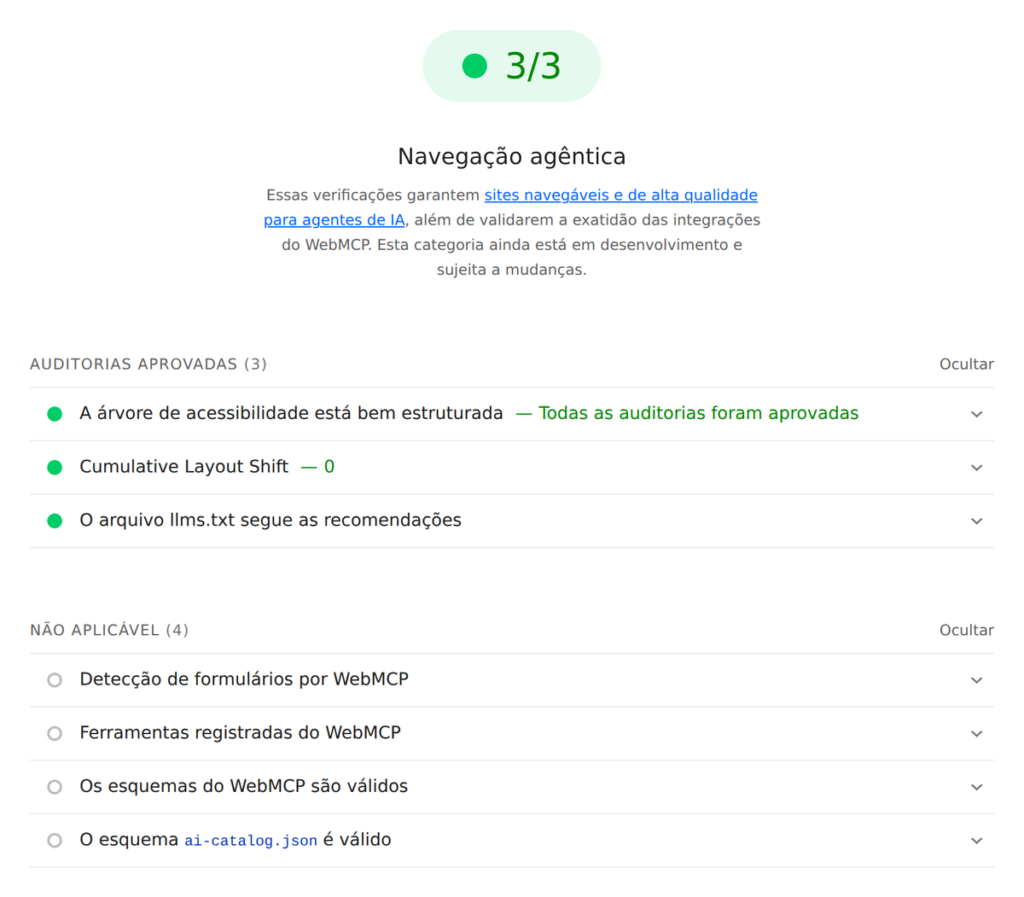
We ran the test on a demo page, with a declared quote form and an llms.txt. The three checks that apply in any browser passed. The four checks for WebMCP and ai-catalog.json show up as not applicable, and the reason is instructive: Lighthouse only evaluates the tools when the browser has WebMCP, and the Chromium 141 used in the test does not have it yet; and the page does not publish an ai-catalog.json. To see those checks at work, the test has to run in a recent Chrome with WebMCP active. Chrome's documentation points to two ways of doing that, on the WebMCP page: the origin trial or the development flag chrome://flags/#enable-webmcp-testing.
Flowup test on September 30, 2026: Lighthouse 13.5.0, Agentic Browsing category, on a demo page with a declared quote form and an llms.txt (screenshot in Portuguese).
Half of these checks apply to any site, with or without WebMCP. Labels on fields, clear names on buttons and a stable layout help the agent, the screen reader and the visitor in a hurry all at once. It is user experience and performance work that already pays off with no agent at all.
And SEO? What changes and what does not
What is fact: there is no statement from Google linking WebMCP or agent readiness to ranking, in either direction. Google's guide to optimizing for generative AI does not mention WebMCP. And Chrome itself says, in the agent-ready toolkit announcement, that when agents are just searching for websites, the principles of SEO still apply.
Our reading: the contest gains one more stage. First, being found on Google. Then, being the answer on AI platforms, which is the work of AEO. Now, being the site where the agent manages to complete the task. A company that shows up in the answer, but whose form the agent cannot use, may lose the last stage to whoever declared the action. It is the continuation of the shift we described in the end of the click.
That is why the starting point is still the basics done well: clear content, consistent structured data, accessible forms and a fast site.
A four-step plan for anyone with a WordPress site
Inventory of actions: list what a customer does on the site today (quote, scheduling, search, customer area) and what they do off the site for lack of a path.
Accessible foundation: fix labels, button names, error messages and layout stability. It pays off now, for people and for agents, and it is what Lighthouse measures.
Abilities with least privilege: register the actions in the Abilities API, mark as public only the ones that should be exposed and test the MCP Adapter in a staging environment, with a dedicated user.
WebMCP pilot: choose one or two key forms, register the tool through JavaScript, which is the format ChatGPT reads, enroll the site in the Chrome origin trial and follow the executions in the logs.
What to track: executions per tool, tasks completed, confirmations declined and schema errors. There is no search engine report for this yet, so the measurement stays on the site itself. In new projects, this layer can be planned from the architecture stage, together with building the site in WordPress; on live sites, it becomes part of the maintenance and governance routine, with updates tested before they go to production.
What is not yet known
Whether WebMCP will become a standard, given WebKit's declared opposition.
How many people will delegate tasks on websites to browser agents, and at what pace.
Whether, and how, search engines will take agent-ready sites into account.
That is why the recommendation is to pilot small and measure, not to rebuild the site.
In short
MCP connects AI clients to systems through the server; WebMCP connects the browser's agent to the open page. The two complement each other.
In WordPress, the Abilities API (since 6.9) declares the actions, and the MCP Adapter delivers them to agents. Version 7.2 is expected to bring the adapter to the official directory.
ChatGPT has used WebMCP since August 31, 2026, only with tools registered through JavaScript.
The effort depends on the number of actions, on whether they only read or also write, and on the integrations. The MCP Adapter runs inside WordPress itself.
Security comes first: least privilege, read before write, confirmation for anything with consequences.
There is no known effect on ranking. The gain lies in the agent completing the task on your site.
Frequently asked questions
What is MCP in WordPress?
MCP in WordPress is the connection between WordPress and AI agents through the Model Context Protocol. The Abilities API, in core since WordPress 6.9, registers what the site can do, with inputs, outputs and permissions. The MCP Adapter turns those abilities into tools that clients such as Claude, ChatGPT and Cursor can discover and run.
What is the difference between MCP and WebMCP?
MCP runs on a server, outside the browser, and is available to any AI client at any time. WebMCP is a Chrome proposal in which the page itself declares tools for the agent built into the browser, and they exist only while the page is open. Chrome recommends using both.
Is WordPress MCP the same thing as the REST API?
No. The REST API publishes routes for systems to read and write data, designed for whoever develops each integration. MCP is a protocol made for AI clients: according to the protocol's documentation, the client asks the server for the list of tools, with name, description and input schema, and the model decides which one to call. In WordPress, the two layers coexist: abilities have routes in the REST API, and the MCP Adapter delivers them as MCP tools.
Do I need to install a plugin to use MCP in WordPress?
Today, yes. The Abilities API has shipped in core since WordPress 6.9, but the MCP Adapter is installed as a Composer package or as a plugin downloaded from GitHub. The WordPress 7.2 roadmap plans to publish it in the official plugin directory. The requirements are WordPress 6.9 or higher and PHP 7.4 or higher. On WordPress.com, MCP is already available on paid plans.
Does WebMCP work in ChatGPT?
WebMCP works in the browser of the ChatGPT desktop app, in ChatGPT Work and in Codex, since August 31, 2026. According to OpenAI's documentation, only tools registered through JavaScript on the top-level page show up. Forms with the declarative attributes and tools inside iframes are not read.
Does my site need MCP to appear in ChatGPT?
No. To appear in ChatGPT search answers, a site needs to be accessible to OAI-SearchBot: according to OpenAI's documentation on its crawlers, sites that block this crawler are not shown in those answers. After that, what counts is clear content and reliable sources, the work of GEO and AEO. MCP and WebMCP serve another purpose: letting an agent carry out tasks on the site.
Does preparing a site for agents improve its Google ranking?
There is no official statement to that effect. Google does not link WebMCP to ranking, and Chrome states that the principles of SEO still apply when agents search for websites. The expected gain comes after the search: the agent managing to complete the task on your site, and not on a competitor's.
Is it safe to let an AI agent act on my WordPress site?
It can be, within limits. The official recommendations are a dedicated user with least privilege, read-only abilities on public endpoints, authentication by application password or OAuth, confirmation for actions with consequences and a log of whatever is executed. Publishing, deleting or charging should remain subject to human approval.
AI agents will request quotes, schedule meetings and look up catalogs on behalf of your customers. The difference between a site they can use and one they abandon starts with simple decisions: what to expose, with which permission and how to measure. Ranking is not enough. Be the answer.
WordPress for AI agents
Find out what your site can offer an agent, and what it should protect
In one conversation, Flowup looks at your WordPress site, its forms and its integrations and points out the first step, with the risks of each path.
Guto Bertoncini is the founder and lead strategist of Flowup Agency, which he has run since 2011. He is the author of the B.I.N.A. Method, Novo SEO and the Base Informacional Semântica (Semantic Information Base), and leads the agency's SEO for AI, GEO and AEO practice, preparing companies to be found on Google and cited by artificial intelligence platforms. He writes about search and AI on the Flowup blog and on his official website.
How Meta charges for the official WhatsApp API per message, Meta’s rates for Brazil in reais, the charge on service messages from October 1, 2026 and the AI rules in…
In engineering and technical B2B, marketing has to prove competence before the first sales contact. An approach built on trust, digital authority, SEO, GEO and AEO.
Related content
Need a quote?
Online now
Hi, this is Iasmin. Would you like a quote for your company?
Send
This site uses cookies to improve your experience. If you continue to use this site, you agree to their use. Privacy Policy